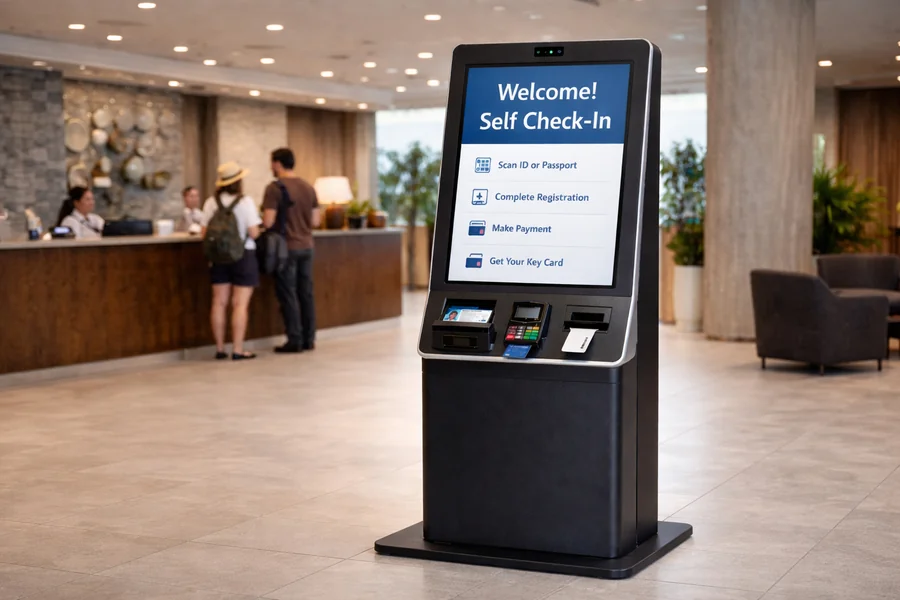
To design a self-service check-in station, map how guests arrive, place enough stations at the entrance to match peak arrivals, mount iPads on stands at a comfortable and accessible height, lock each one into a single check-in app, keep the screen flow to a few taps, and add clear signage plus a greeter. Test everything before the doors open.
A line that stretches past the entrance sets the wrong tone for any event. Many organizers fix it by choosing to rent iPad floor stands for the arrival area, so several guests can check themselves in at once while staff deal with the exceptions.
What Makes a Good Self-Service Check-In Station?
A good station is easy to spot, quick to use and hard to break. It has a stable stand at the right height, a tablet locked to one app, a simple search or QR scan, clear signage, reliable power and internet, and a nearby greeter to help anyone who gets stuck. A printed backup list rounds it out.
What Is a Self-Service Check-In Station?
A self-service check-in station is a device, usually a tablet on a stand, that lets guests confirm their own registration on arrival, often by scanning a QR code or searching their name. Some stations also print badges on the spot.
Done well, guests walk in, check in within seconds and move on. Done badly, they stand in front of a frozen screen and ask someone to help, which defeats the point.
Hardware is half the battle, and it pays to plan it early. A provider such as The Tekk Group supplies iPads and stands for events, so you can arrange devices, stands and delivery together rather than piecing them together from several suppliers.
How to Design the Station, Step by Step
Step 1: Map Guest Flow and Count Your Stations
Walk the route from the door to the main room and decide where check-in sits so it does not block traffic. As a rough starting point, plan one station for every 50 to 75 guests expected in the busiest half hour, then adjust after your test run.
Step 2: Choose Stable, Secure Hardware
Tablets on wobbly tables get knocked, tilted and sometimes walked off with. An iPad floor stand rental gives you a free-standing unit with a locked enclosure, so the device stays upright and put even when the crowd gets busy.
Step 3: Set the Right Height and Make It Accessible
Guests of different heights and abilities all need to reach the screen. Many designers place the center of the screen roughly 40 to 48 inches off the floor, with an angle that reduces glare. Include at least one lower or adjustable station, and leave enough room around it for a wheelchair or stroller. An iPad kiosk stand hire usually offers adjustable height and tilt, which helps here.
Step 4: Lock the iPad Into Kiosk Mode
Guests should only ever see the check-in screen. Use the iPad’s Guided Access feature or your check-in app’s kiosk mode to lock the device to a single app and disable the home button. Turn off notifications so nothing personal pops up mid-check-in.
Step 5: Keep the Screen Flow Short and Private
Aim for three taps or fewer: scan a code or type a name, confirm, done. Show only the guest’s own details, never a scrolling list of other attendees. Large buttons and plain wording beat clever design every time.
Step 6: Add Signage and a Greeter
Put a sign at eye level and another visible from the entrance, with one clear instruction such as scan your QR code or type your name. Station a greeter nearby to guide first-timers and handle special cases, so the self-service line keeps moving.
Step 7: Plan Power, Connectivity and Printing
Route cables under mats or along the stand so nobody trips. Test the Wi-Fi where the stations will actually sit, and check whether your app works offline or needs a cellular backup. If you print badges, place the printer within sight of the station and stock extra paper and ribbon.
Step 8: Test, Then Keep a Fallback
Run a full check-in with test names before the doors open, including a failed scan and a misspelled name. Keep a printed guest list and a spare iPad at the desk. If something fails, staff can switch to the backup in under a minute.
Floor Stands, Tabletop Stands or a Staffed Desk?
Most events use a mix. A tablet floor stand rental suits busy entrances where space is tight and the units need to be moved around. This table shows where each option fits.
| Option | Best for | Strengths | Watch out for |
| Floor stand kiosk | Busy entrances, large events | Free-standing, easy to position, comfortable height | Needs floor space and a planned power route |
| Tabletop stand | Small events, tight spaces | Compact and quick to set up | Needs a table at the right height |
| Staffed desk | VIPs, speakers, problem cases | Personal service, handles exceptions | Slower when many guests arrive together |
Common Mistakes to Avoid
- Placing stations right at the door, where queues block the entrance.
- Leaving the iPad unlocked so guests can wander out of the app.
- Setting the screen too high or too low for many guests.
- Skipping the Wi-Fi test at the exact spot the stations sit.
- Having no greeter or backup list.
Frequently Asked Questions
1. How many check-in stations do I need?
A rough starting point is one station per 50 to 75 guests arriving in the busiest half hour. Test on the day and add stations if lines grow.
2. What height should an iPad kiosk stand be?
Many designers place the screen center around 40 to 48 inches off the floor. Provide at least one lower or adjustable station for accessibility.
3. How do I stop guests from leaving the check-in app?
Use Guided Access or your app’s kiosk mode to lock the iPad to one app, and use a stand with a secure enclosure.
4. Can guests print their own badges?
Yes, with a compatible app and printer placed near the station. Keep spare supplies on hand and a staff member close by.
5. What if the Wi-Fi drops during check-in?
Switch to an offline mode if your app has one, use a cellular hotspot, or fall back to the printed guest list until the connection returns.
6. Do I still need staff at a self-service station?
Yes. One greeter for every few stations keeps lines moving and helps anyone who gets stuck.
Final Thoughts
A good check-in station feels invisible. Guests arrive, tap a few times and walk in, and nobody thinks about the technology behind it. Plan the flow, lock the device down and test the whole setup before the day. When you need iPad display stand rental for an upcoming event, The Tekk Group is a dependable place to start, and the team can help you match stands and devices to your venue and guest numbers.